
Stoneledger CIS Companion · for CIS businesses on Xero, QuickBooks or Sage

Keep Xero. Get the CIS tools you actually need.

Specialist CIS deductions, statements, retentions, reconciliations and contractor workflows - without replacing your accounting software. Bring in the files Xero, QuickBooks or Sage export, and see both sides of CIS in one place.

Reads the files your software exports. It never asks for your Xero, QuickBooks or Sage password.

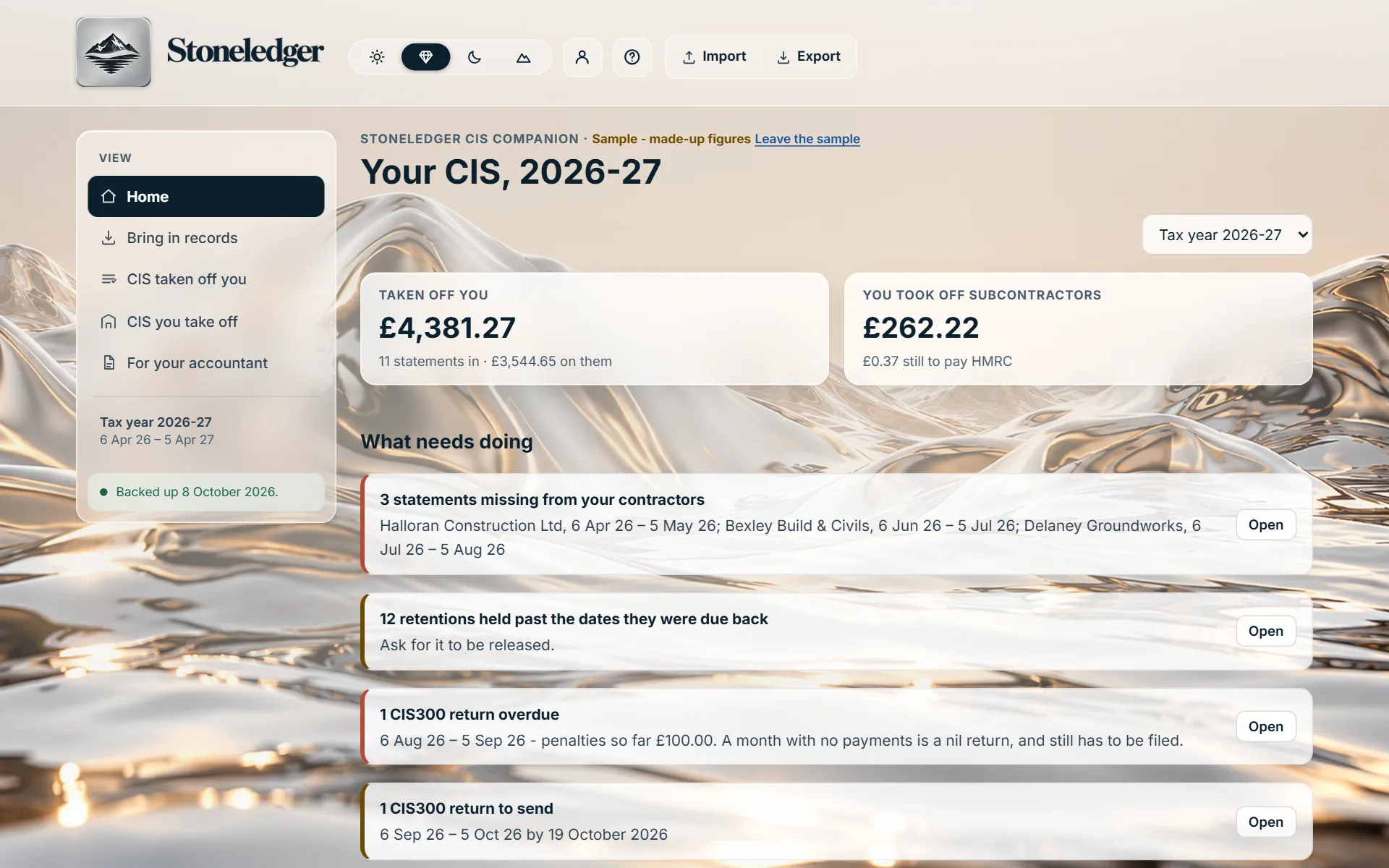
A sample business on both sides of CIS · made-up figures

Taken off you£3,420.00by 3 contractors this tax year
You took off£1,240.00from 2 subcontractors, for HMRC

What needs doing

Click it. Each one opens to what it is about.

A sample business on both sides of CIS: £3,420 taken off it by three contractors, £1,240 it took off two subcontractors, and four things to do - a missing statement, a retention due back, a CIS300 return to send and a subcontractor to verify.

Two ways to Stoneledger's CIS

Keep your software, or move everything. Your choice.

You keep Xero, QuickBooks or Sage

Stoneledger CIS Companion

Your books stay where they are. The Companion takes the files your software exports and does the CIS work around them: statements, deductions, retentions, the CIS300 and what needs doing next.

See the Companion's prices

You want one place for everything

Stoneledger

Your whole books, CIS built in, VAT, Self Assessment and Making Tax Digital - for less than the Companion - in place of your accounting software, not beside it.

See Stoneledger's prices

Already use Stoneledger? Everything in the Companion is in it already - you never need both.

Pricing

One price for both sides of CIS. Round numbers, nothing added.

Monthly

£15 a month

Everything in the Companion, for one business on either side of CIS or both.

  • Cancel any time
  • Your books on any device you sign in on
  • Bring in your software's files as often as you like
Start free

For the whole year

Yearly

£120 a year

A third less than paying monthly

The same, paid once for the year - every tax month, every statement and every CIS300 of it.

  • Your accountant's file whenever they ask
  • Your books on any device you sign in on
  • Bring in your software's files as often as you like
Start free

Start with 30 days free, no card - choose monthly or yearly before it ends, or simply stop. No VAT to add: Stoneledger is not registered for VAT.

See inside

The Companion, with a sample business on both sides of CIS.

Click a screen to see it larger.

Why CIS ends up in a spreadsheet

Your books are in order. CIS still runs on its own clock.

Tax months, not calendar months

CIS runs from the 6th of one month to the 5th of the next. A statement is due within 14 days of each, a CIS300 by the 19th - and a payment belongs to the month it is made in, not the month it was invoiced.

Statements that do not match

Contractors' statements arrive late, go missing or show a different figure from what you were paid. Finding which, month by month and contractor by contractor, is the work most often left until the year end.

Retention, and labour from materials

CIS comes off labour only - never materials, never VAT. Retention held back is paid months later, and its CIS is taken then. Both have to be followed through every payment.

How it works

Three steps, from your software's own export.

  1. 1

    Export from your software

    Your sales invoices, your bills or your contacts, as the CSV or Excel file Xero, QuickBooks or Sage gives you. Nothing to reformat.

  2. 2

    Say what CIS applies to

    Tick which customers take CIS off you and which suppliers you take it off, which accounts are labour and which materials, and when they were paid. You see everything before anything is kept.

  3. 3

    See what needs doing

    Statements missing or wrong, CIS300 returns due, subcontractors to verify, retention to chase - and your accountant's file whenever they ask.

What the Companion does

Both sides of CIS, worked out by Stoneledger's own CIS engine.

When CIS is taken off you

  • Every contractor's deductions, month by month and for the year
  • Their statements against what you were paid, with missing months found
  • 20% and 30%, gross payment status, and when your status changed
  • Retention held, when it is due back, and its CIS when paid
  • Statement copies kept with the figures

When you take CIS off others

  • Your subcontractors, their verification and the rate each is due
  • CIS on labour only, at the rate on the day you pay
  • Each month's CIS300 prepared, nil months included
  • The payment and deduction statements you owe, within 14 days
  • Returns overdue, and the penalties they have built up

Around both

  • One list of what needs doing, on both sides
  • Every record opens to where it came from: file, line and date
  • The same file brought in twice is recognised, never doubled
  • An import can be undone in one step
  • One Excel file for your accountant, both sides of the year

Worked examples · made-up figures

The rules the Companion follows, on real-looking figures.

As a contractor: paying a subcontractor

An invoice for £2,000.00 of labour and £500.00 of materials. CIS comes off the labour only, at the rate HMRC gave when you verified them:

What you take off and pay, by the subcontractor's CIS status
Their statusCIS taken offYou pay them
Registered, verified£400.00£2,100.00
Not matched by HMRC£600.00£1,900.00
Gross payment status£0.00£2,500.00

What you took off goes on that tax month's CIS300, and on the statement you give them.

As a subcontractor: one invoice, two payments

£6,000.00 of labour and £1,200.00 of materials, at 20%, with 5% retention held back. Both businesses are VAT registered, so the reverse charge applies and no VAT is on the invoice:

  1. Paid now£5,700.00 reaches you£7,200.00, less £360.00 retention and £1,140.00 CIS on the £5,700.00 of labour paid
  2. Retention released£300.00 reaches youThe £360.00 held, less £60.00 CIS on its £300.00 of labour - taken in the month it is paid

So the year's statements show £1,200.00 taken off this job in total, in the two tax months it was paid in.

Before and after

The same month of CIS, two ways.

A spreadsheet beside your software

  1. Copy each payment into the spreadsheet, and split labour from materials by hand
  2. Work out which tax month each payment falls in
  3. Tick statements off against the payments as they come in, and chase the ones that do not
  4. Keep a separate list of retention, and remember its CIS when it is paid
  5. Total the month for the CIS300, and again for your accountant at the year end

With the Companion

  1. Bring in the month's export from your software
  2. Each payment lands in its tax month, labour and materials apart, CIS worked out
  3. Missing and mismatched statements are listed, contractor by contractor
  4. Retention is followed to the day it is due, and its CIS taken when paid
  5. The CIS300 and your accountant's file are already made up

Xero, QuickBooks and Sage

Your software's own files today. Live connections are not built yet.

The Companion reads sales invoices, bills and contacts exported from Xero, QuickBooks and Sage, in CSV or Excel, and any spreadsheet with similar columns. It reads each column by what it means rather than by one package's spelling, so a file with its columns in another order still reads - and it shows you what it found before anything is kept.

It never writes anything back to your accounting software, and never asks for its password.

  • XeroNot connected to Xero: bring in the files Xero exports.
  • QuickBooksNot connected to QuickBooks: bring in the files QuickBooks exports.
  • SageNot connected to Sage: bring in the files Sage exports.
  • Sending CIS300 returns to HMRCTested with HMRC's test service and recognition applied for. Until HMRC grants it, Stoneledger cannot send CIS returns to HMRC.

Compared with Stoneledger

The same CIS engine. The difference is where your books live.

The CIS Companion and Stoneledger, side by side
What you needCIS CompanionStoneledger
Your accounting softwareKeep Xero, QuickBooks or SageStoneledger is your accounting software
CIS on both sidesYesYes
Statements, retention, CIS300YesYes
How records arriveFrom your software's exportsKept in Stoneledger as you go
VAT returns, Self Assessment, Making Tax DigitalStay with your softwareYes
Price£15 a month or £120 a year£8 a month or £50 a year

For accountants

Construction clients on Xero? Their CIS arrives in order.

A client on the Companion brings in their own exports through the year, so their statements are checked, their retention followed and their CIS300s made up before you see them - and the year arrives as one Excel file. Your practice keeps its own software too.

Stoneledger for accountants

Questions

What CIS businesses ask first.

Do I have to stop using Xero, QuickBooks or Sage?

No. That is the point of the Companion: your books stay in your accounting software, and the Companion does the CIS work beside them, from the files your software exports.

Does it connect to my Xero account?

Not yet. Today you export your invoices, bills or contacts from Xero and bring the file in - it takes a minute. A live connection needs Stoneledger's own app registered with Xero - and certified by Xero before it can be offered widely - which has not been started yet; the same goes for QuickBooks and Sage. When one is built it will read only what CIS needs, and only with your say-so.

Will it change anything in my accounting software?

No. It reads the files you bring in and never writes anything back. If a figure needs correcting, you correct it in your own software and bring the file in again.

What if I bring the same file in twice?

Every invoice and bill is known by where it came from and its own number, so a second copy is recognised and not added again. If an invoice has changed since, you are told before anything is kept, and a whole import can be undone in one step.

Can it send my CIS300 to HMRC?

Not yet. The Companion prepares each month's return - nil months included - and tells you when it is due. Stoneledger has tested its CIS returns with HMRC's test service and applied for recognition; until HMRC grants it, send the return through HMRC's own online service or software on HMRC's list.

I am a contractor and a subcontractor. Do I need two?

No. One Companion covers both sides of CIS for one business, and you choose which sides you use when you start.

I already use Stoneledger. Do I need the Companion?

No. Everything in the Companion is already in Stoneledger, built in. The Companion is for businesses that want to keep their current accounting software.

What happens when the free trial ends?

Choose monthly or yearly to carry on, with everything you have brought in kept. No card is asked for at the start, so if you do nothing, nothing is charged.

Where are my records kept, and who can see them?

On Stoneledger's server in London, behind your password and an authenticator code. Nobody sees them unless you invite them - your accountant, for instance - and you can export everything whenever you like.

Is this tax advice?

No. The Companion applies HMRC's CIS rules to the records you bring in and shows how each figure is worked out, so you and your accountant can check it. For your own circumstances, speak to a qualified adviser.

Keep your software. Get your CIS in order.

Bring in last month's export and see what needs doing, on both sides of CIS. 30 days free, no card.

Xero, QuickBooks and Sage are trademarks of their owners. Stoneledger is independent and not affiliated with, endorsed by or a partner of any of them; the CIS Companion reads the files they let you export.

Register interest

Be first when Stoneledger opens.

Tell us a little about your lettings and we’ll let you know as soon as it’s ready for you. Fields marked * are required.

Business type *

Book a demo

See Stoneledger on a book like yours.

Leave your details and a time that suits you, and we’ll be in touch to confirm it. Fields marked * are required.