Stoneledger Accounts Filing · for companies, LLPs, charities and their accountants

Company accounts. Without changing your accounting software.

Import your figures, prepare your accounts, review every number and complete the filing process when the relevant filing service is available. Your trial balance from Xero, QuickBooks, Sage or a spreadsheet becomes your company's statutory accounts - checked against it to the pound.

See your accounts free. Pay only for the finished files.

The sample company · made-up figures

Trial balance in23 linesdebits £272,900 = credits £272,900
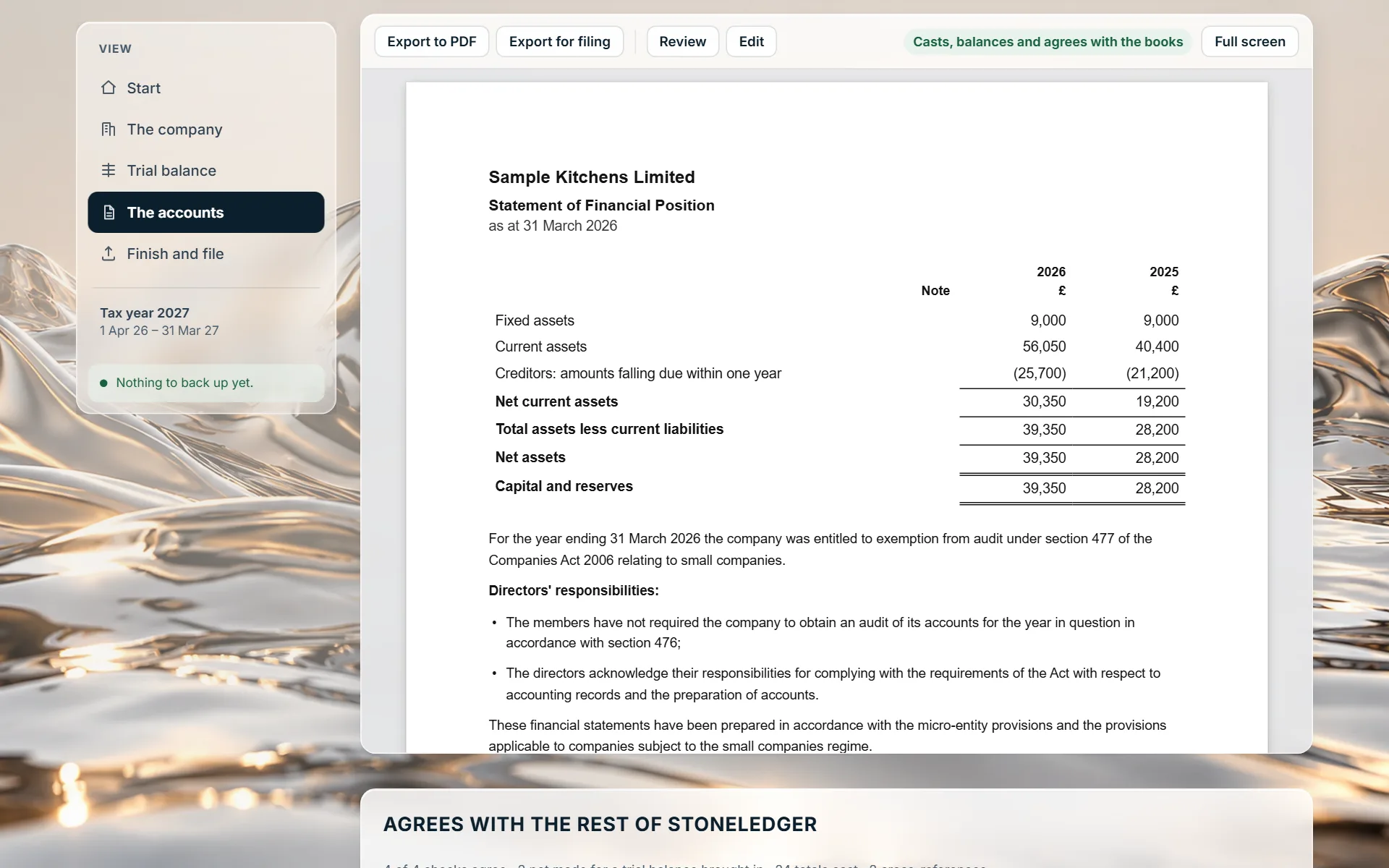
Accounts out£39,350net assets, agreeing to the pound

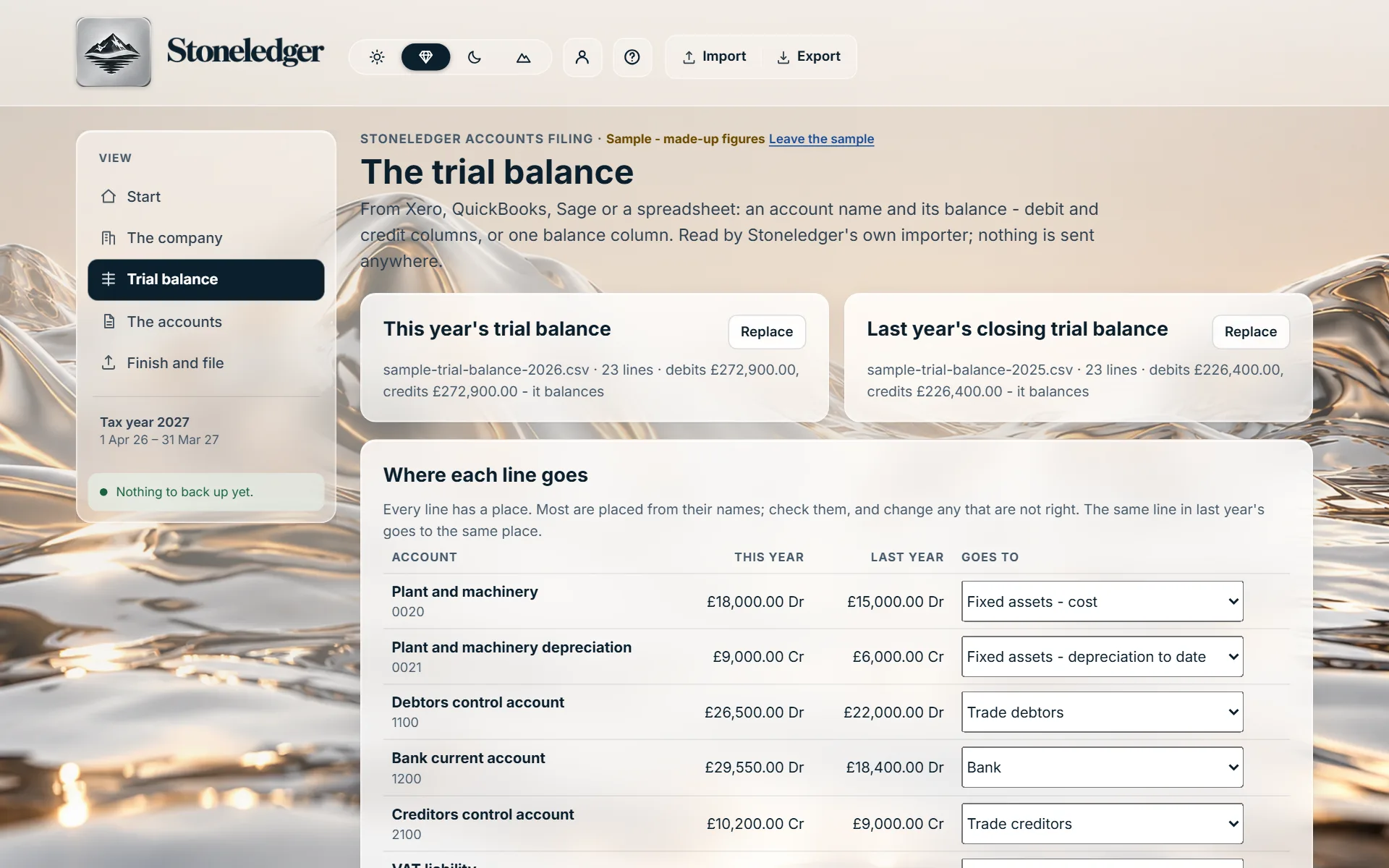
Where each line goes

Click it. Each line says why it went where it did.

The sample company: a trial balance of 23 lines, debits and credits of £272,900 each, becomes accounts showing net assets of £39,350, with four lines explained - depreciation to date, bank charges, Corporation Tax and the retained earnings brought forward.

Pricing

Prepare and check for nothing. One price for the finished year.

Preparing and checking

Free

Bring in your trial balances, place every line and see your company's accounts on screen, with every check - before you pay anything.

  • No account needed to start
  • The sample company to look round first
  • Kept on your device until you sign in
Start preparing

One company, one year

The finished accounts

£50 once

For one company's year: the files you need to approve, file and hand over.

  • The finished accounts as a PDF
  • The inline XBRL file Companies House's software filing takes
  • The handover file: every trial balance line and where it went
  • Make them again whenever the figures change
  • Filing from Stoneledger - not open yet
Prepare your accounts

No subscription and no account fee: each company's year is bought on its own. No VAT to add: Stoneledger is not registered for VAT. The Company Tax Return is not part of it - it is not built yet.

See inside

Accounts Filing, with the sample company.

Click a screen to see it larger.

How it works

From trial balance to finished accounts, in four steps.

  1. 1

    The company

    Private or public limited company, charitable company or LLP: its registered name, number and office, the year end, whether it is audited, and any subsidiaries.

  2. 2

    The trial balance

    This year's, before closing entries, and last year's closing one for the comparatives - not needed for first accounts. Accounts with a cash flow statement take the year before's too.

  3. 3

    Where each line goes

    Placed from its name, its code and its sign. Check them; change any that are not right. Nothing goes on until both balance and every line is placed.

  4. 4

    The accounts

    The statements and notes in the format the company qualifies for, the approval and who signs, every figure checked - then the finished files.

Who it is for

Companies, LLPs and charities of every size, whatever software keeps their books.

For

  • Private limited companies and LLPs - micro, small, medium-sized and large
  • Companies that need an audit, with the auditor's report in the auditor's own words
  • Groups - consolidated accounts, with the parent company's own balance sheet beside them
  • Charitable companies, with independent examination or audit as their income requires
  • Public limited companies whose shares are not traded on a stock exchange
  • First accounts, and every year after
  • Accountants and auditors preparing a client's accounts from the client's own software

The formats

  • Micro-entity accounts (FRS 105), and their filing copy
  • Small company accounts (FRS 102 section 1A), filleted or abridged
  • Full accounts (FRS 102), with the strategic report and the auditor's report where the company needs them
  • Group accounts (FRS 102 section 9): goodwill, non-controlling interests and everything within the group taken out
  • Charity accounts under the Charities SORP (FRS 102): the statement of financial activities with each fund, and the trustees' annual report
  • Dormant company accounts

Not for

  • Listed companies - their group accounts follow UK-adopted international accounting standards
  • Banks, insurers and the other companies whose accounts take forms of their own
  • A charity's group accounts with its trading subsidiary
  • Charitable incorporated organisations and unincorporated charities, which report to the Charity Commission, not Companies House
  • Overseas companies

Each format is offered only where the company qualifies for it, and the reason is given where it does not - abridged accounts, for instance, need every member's consent for the year. An audit opinion or an independent examiner's report is never written by Stoneledger: it is the auditor's or examiner's own, put in word for word.

Imports, checks and what comes out

Every total traced to the trial balance line it came from.

What it reads

A trial balance from Xero, QuickBooks or Sage, or any spreadsheet, as CSV or Excel: an account name and its balance, as debit and credit columns or one balance column, with its code where there is one. Columns are read by what they mean, so Sage's "N/C" is read as the code.

What it checks

Each trial balance balances; every line is placed; last year's closing reserves - or a charity's funds - follow into this year's. Then every statement casts, every note ties to its line, and profit and net assets agree with the trial balance. A check these books cannot make says so - it is never shown as passed.

What comes out

The finished accounts as a PDF; the inline XBRL file Companies House's software filing takes; and the handover file - every line of each trial balance, where each went and what each line of the accounts is made of - for your records or your accountant.

The balance sheet, checked against the ledger: Stoneledger Accounts Filing, showing a sample company with made-up figures
The balance sheet, with last year beside it, checked against the trial balance · Sample: a made-up company, two years

Filing, as it stands

Preparing a valid file is not the same as filing it.

  • Filing accounts at Companies HouseTested with Companies House's test service. Companies House has not yet given Stoneledger live filing, so it cannot file accounts yet - the accounts file it prepares can be filed through other software.
  • The Company Tax Return (CT600) to HMRCNot available yet: Stoneledger does not file Company Tax Returns.
  • Until Stoneledger can fileFile the accounts through other filing software, or Companies House's own service, and your Company Tax Return through software that sends it. When Stoneledger can file, each filing will ask for the company's own authentication code at that moment and never keep it.

Keeping your books in Stoneledger?

Then the accounts come from your books, with nothing to bring in.

Stoneledger, the full product, prepares the same statutory accounts straight from the ledger it keeps all year - with VAT, CIS, payroll and Corporation Tax beside them - so there is no trial balance to export at all.

See Stoneledger

Questions

What directors and accountants ask first.

Can Stoneledger file my accounts at Companies House?

Not yet. Companies House's XML team accepted Stoneledger's test filings in October 2026, and live filing waits on Companies House opening its live service to Stoneledger. Until then you get the finished accounts and the file for filing, and file them through other software or Companies House's own service. This page will say the day that changes.

Does it do the Company Tax Return?

No. The Company Tax Return (CT600) is a separate return to HMRC, with its own rules and its own approval, and it is not built. The accounts' tax charge is the one in your trial balance.

Which trial balance do I need?

This year's, at the year end, before any closing entries - so the income and cost accounts still show the year's figures - and last year's closing trial balance for the comparatives. A company's first accounts need only this year's. Accounts with a statement of cash flows, and a group whose subsidiary was already held when last year began, need the year before's closing trial balance as well: last year's figures start from it.

Does it prepare audited accounts, group accounts and charity accounts?

Yes. A company that is audited - by law, because its members asked, or by choice - gets the directors' responsibilities, the strategic report where it needs one, and the auditor's report exactly as the auditor signed it. A parent company gets consolidated accounts for its group from each company's trial balance. A charitable company gets accounts under the Charities SORP, with its unrestricted, restricted and endowment funds, the trustees' annual report, and the independent examiner's or auditor's report its income calls for. What each still needs before approval is listed on screen.

What if a line goes to the wrong place?

Change it: every line's place is shown beside it, and the same line in last year's trial balance follows. A line the rules cannot place is left for you to choose, never guessed, and nothing goes into the accounts until every line has a place.

What do I pay for?

Preparing and checking are free. You pay once for each company's year when you want the finished files: the PDF, the inline XBRL file and the handover file. Change the figures afterwards and make them again, at no extra cost.

Can my accountant use it?

Yes - it is made for accountants preparing a client's accounts from the client's own software as much as for directors. The handover file shows every line of both trial balances and where each went.

Who approves the accounts?

The directors - a charity's trustees - or an LLP's members. Stoneledger asks for the date they were approved and who signs, and puts them on the accounts; the responsibility for the accounts stays with the company.

Is my company's data kept anywhere?

Until you sign in, everything stays in your own browser on your device. Signed in, it is kept on Stoneledger's server in London, behind your password and an authenticator code.

Your trial balance in. Your company's accounts out.

See them free, checked to the pound, and pay £50 for the finished year only when you want it.

Prepare your accounts

Xero, QuickBooks and Sage are trademarks of their owners; Stoneledger is independent and not affiliated with or endorsed by them. Stoneledger prepares accounts from the figures you give it; the company's directors or members are responsible for its accounts, and this is not accounting or tax advice.

Register interest

Be first when Stoneledger opens.

Tell us a little about your lettings and we’ll let you know as soon as it’s ready for you. Fields marked * are required.

Business type *

Book a demo

See Stoneledger on a book like yours.

Leave your details and a time that suits you, and we’ll be in touch to confirm it. Fields marked * are required.